
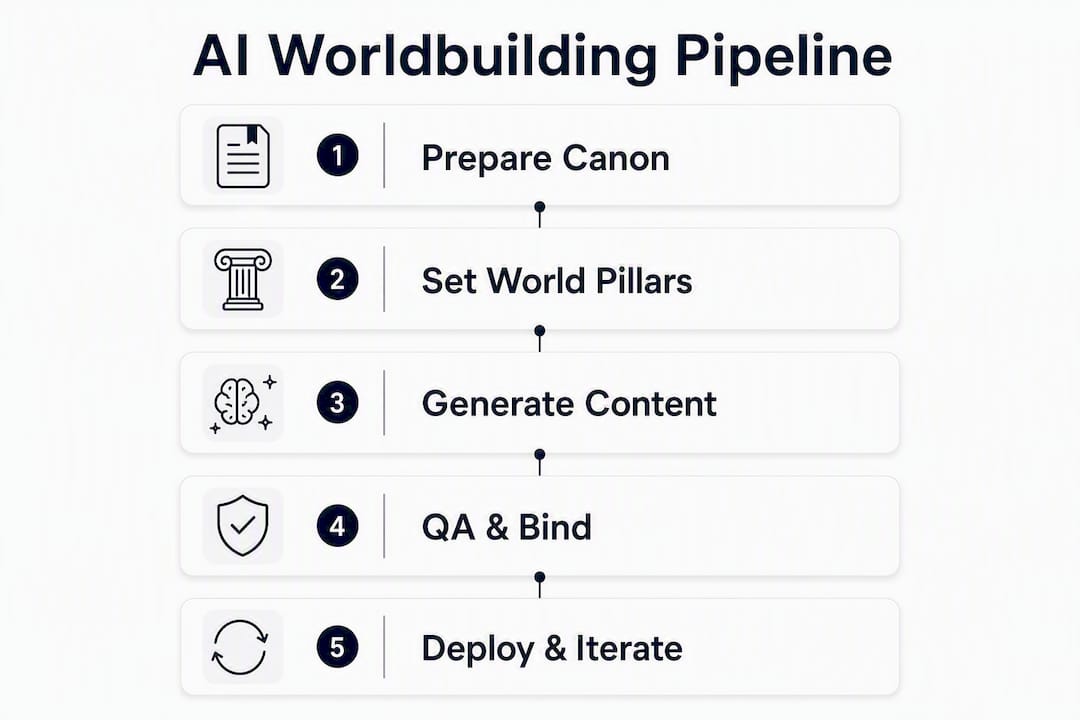
The repeatable studio-grade pipeline is: World Pillars → One-Page Canon → constrained generation → validation → engine integration. Start today by drafting three World Pillars and a one-page canon note in your GDD. That single document becomes the source of truth every LLM call, every procedural generator, and every QA check references. Tools like GPT-4 (OpenAI), Claude (Anthropic), and Gamedesignerx’s canon modules slot into this pipeline once the canon exists. Without it, you are generating noise.
Table of Contents
- What does a studio-ready AI worldbuilding pipeline look like?
- How do you design World Pillars and a One-Page Canon?
- How do you bind AI output to world constraints?
- Which tools belong in a US studio’s AI worldbuilding stack?
- How do you test for traversability, consistency, and narrative regressions?
- How should teams govern AI contributions and version the canon?
- What do timelines and costs look like from indie to mid-studio?
- Mini worked example: a fantasy port town
- Six steps to start your AI worldbuilding pilot this week
- Key Takeaways
- Where AI actually earns its keep in a studio
- Gamedesignerx fits this pipeline from canon to engine
- Useful sources and docs to consult next
What does a studio-ready AI worldbuilding pipeline look like?
The five-stage workflow runs from brainstorm to engine-ready assets with a clear deliverable at each gate.
- Stage 1 — World Pillars: Three short statements covering tone, theme, and twist. Output: a one-paragraph doc your whole team can read in 60 seconds.
- Stage 2 — One-Page Canon: Canonical JSON capturing core rules, key factions, travel times, and magic/tech invariants. Output: the file every bound chat and RAG store references.
- Stage 3 — Constrained generation: LLM sessions locked to the canon. Output: location descriptions, NPC dialogue, and quest hooks that cannot contradict the canon keys.
- Stage 4 — Validation: Automated checks plus playtests. Output: a pass/fail report against navmesh, stat caps, and timeline consistency.
- Stage 5 — Engine integration: Export via JSON, CSV, or REST API into Unity or Unreal Engine. Output: game-ready assets with verified traversability.
Sprint checklist (copy into your ticket board):
- [ ] Write 3 World Pillars (owner: lead designer)
- [ ] Draft One-Page Canon JSON (owner: narrative director)
- [ ] Configure bound chat sessions keyed to canon (owner: technical designer)
- [ ] Run first constrained generation batch (owner: content team)
- [ ] Execute automated validators (owner: QA lead)
- [ ] Export to engine and run traversal test (owner: engineer)
Pro Tip: Run the first iteration as a 48–72 hour sprint. Lock the canon before anyone generates a single location. Changing the canon after generation begins costs far more time than writing it carefully upfront.
How do you design World Pillars and a One-Page Canon?
World Pillars are three short, opinionated statements. They are not lore. They are editorial constraints that every piece of generated content must serve.
| Field Description Suggested Length | ||
| Tone | The emotional register of the world (e.g., “melancholic and pragmatic, never whimsical”) | 1 sentence |
| Theme | The central human question the world asks (e.g., “What do people sacrifice to belong?”) | 1 sentence |
| Twist | The one rule that makes this world mechanically distinct (e.g., “Memory is a tradeable commodity”) | 1–2 sentences |
The One-Page Canon is the operational document. Keep it under one page deliberately. Every field maps to an export key the engine or QA tool can validate.
| Canon Field Example Value Export Key | ||
| Core rule | “Memory costs energy; casting erases a day’s recall” | rule_memory_cost |
| Key faction | “The Archivists: control memory banks, charge per retrieval” | faction_archivists |
| Travel times | “Port to capital: 3 days by sea, 7 by road” | travel_port_capital |
| Magic invariant | “No memory can be duplicated, only transferred” | invariant_no_copy |
| Tech invariant | “Steam-powered recall devices fail above 4,000 ft elevation” | invariant_altitude_fail |
Keep the canon small on purpose. Practitioners recommend filtering AI-generated ideas aggressively, retaining roughly 10–20% of what the model produces. A scene budget rule helps: every detail in the canon must pay for its place by establishing stakes, clarifying a choice, or triggering a consequence.
Pro Tip: When the canon hits two pages, stop and cut. If a rule does not affect a scene or a player decision, it belongs in a background notes file, not the canon.
How do you bind AI output to world constraints?
Three methods keep LLM output grounded: bound chats, context-locking, and retrieval-augmented generation (RAG).

Bound chats are context-locked sessions where the canonical JSON is injected at the start of every conversation. The model cannot contradict what it has already been given. RAG stores the canon in a vector database so any generation call retrieves the relevant rules before producing output. Together, these two methods cut lore drift significantly across long projects and multiple contributors.
Enforcement checklist for generated content:
- [ ] Engine invariants: does the output reference only factions, locations, and rules defined in the canon?
- [ ] Navmesh awareness: do described paths correspond to traversable routes in the engine layout?
- [ ] Stat caps: do NPC stats and item values fall within the ranges defined in the canon?
- [ ] Rule invariants: does the output respect all hard invariants (e.g.,
invariant_no_copy)? - [ ] Canon key presence: does the output include the correct export keys for QA lookup?
A minimal tagging schema for generated content looks like this:
QA tools or CI scripts query navmesh_validated and stat_range_check before any asset merges into an engine branch. Hybrid workflows that pair LLM reasoning with procedural enforcement handle functional consistency far better than pure generative models, particularly for traversability.
Which tools belong in a US studio’s AI worldbuilding stack?
Each tool category covers a distinct layer of the pipeline. Assign a clear owner for each.
| Category Tool / Platform Best For Owner | |||
| LLM reasoning | GPT-4 (OpenAI) | Dialogue, lore generation, logic checks | Narrative designer |
| LLM reasoning | Claude (Anthropic) | Long-context canon review, consistency audits | Technical designer |
| GDD + canon | Gamedesignerx | Canon modules, collaboration, export, Unreal plugin | Lead designer |
| Procedural gen | Houdini | Terrain, dungeon layouts, navmesh generation | Environment artist |
| Engine (PC/console) | Unreal Engine | Runtime integration, navmesh, plugin support | Engineer |
| Engine (mobile/indie) | Unity | Cross-platform builds, lightweight plugin integration | Engineer |
The practical rule: use GPT-4 or Claude to reason about the world and catch logical contradictions. Use Houdini and your engine’s procedural tools to enforce structural constraints the LLM cannot guarantee on its own. Neither replaces the other.
Integration notes: Gamedesignerx exports canon data as JSON or CSV and exposes a REST API for engine-side lookups. The Unreal Engine plugin pulls canon keys directly into the editor, so level designers see constraint violations without leaving the tool. Unity integration follows the same JSON schema. Keep the canonical JSON in version control and treat it as a code artifact, not a design note.
How do you test for traversability, consistency, and narrative regressions?
Add these checks to your CI pipeline and playtest schedule in priority order.
- Navmesh consistency: assert that every location described in generated content maps to a traversable node. Failing assertion:
assert(navmesh.seamless == true). - Stat-range enforcement: validate that all NPC and item stats fall within canon-defined bounds. Failing assertion:
assert(stat.value between min and max). - Timeline consistency: confirm that event dates are monotonically increasing and do not contradict established history. Failing assertion:
assert(timeline.eventDates are monotonic). - Canon key presence: run a RAG lookup to confirm every generated asset references at least one valid canon key. Assets with zero canon keys are flagged for review.
- Narrative regression test: for each new content batch, verify that lore has on-page consequences. A practical filter: for every page of raw lore produced, ensure 3–4 pages of content where that lore directly affects a character decision or player choice.
- Playtest traversal cases: design two test cases per new location. One tests whether a player can complete the intended path without getting stuck. The second tests whether the generated content creates a meaningful choice or is purely decorative.
How should teams govern AI contributions and version the canon?
Role matrix:
| Role Responsibility | |
| Lead designer | Writes and owns World Pillars; approves canon changes |
| Narrative director | Maintains One-Page Canon JSON; reviews generated lore |
| Technical designer | Configures bound chats and RAG; manages export keys |
| QA lead | Runs automated validators; owns regression test schedule |
| Engineer | Merges validated assets into engine branches |
Editorial rule: apply the Rule of Three to every generated concept. A world element earns its place only when it appears as a mention, then a variation, then a consequence across at least three scenes. If it never reaches consequence, cut it from the canon.
Versioning works best when the canonical JSON lives in the same repository as the game code. Tag each canon version with a sprint number. Gamedesignerx modules map directly to GDD sections, so a canon change in the platform triggers a visible diff that the narrative director must approve before the next generation batch runs.
What do timelines and costs look like from indie to mid-studio?
| Phase Timeline Engineering Effort LLM/API Spend Tooling Hours | ||||
| Pilot (1 designer, 1 engineer) | 2–4 weeks | 20 hrs | Low (prompt testing) | 10–20 hrs |
| Small rollout (3–5 person team) | 2–3 sprints | — | Moderate (RAG setup) | 30 hrs |
| Full integration (mid-studio) | 3–6 months | 200 hrs | Ongoing (API usage) | 100 hrs |
Recurring costs to budget: LLM API usage scales with generation volume, so set monthly token caps early. Cloud build runners for CI validators add a modest but consistent line item. Model fine-tuning, if pursued, is a one-time cost per major canon revision.
Mini worked example: a fantasy port town
World Pillars
- Tone: Weathered and mercantile. Every conversation has a price.
- Theme: Who controls information controls survival.
- Twist: Memories are currency. The poor forget; the wealthy remember everything.
One-Page Canon (excerpt)
Bound chat prompt snippet
This prompt produces a location tied to canon keys, ready for QA validation and engine import.
Six steps to start your AI worldbuilding pilot this week
- Step 1 — Pick pilot scope (owner: lead designer; done when: one zone or chapter defined). Start with a single zone, not the whole world.
- Step 2 — Write 3 World Pillars (owner: lead designer; done when: pillars fit on one index card). Tone, theme, twist. Nothing else.
- Step 3 — Create One-Page Canon (owner: narrative director; done when: JSON file committed to repo). Include all five field types from the template above.
- Step 4 — Set up bound chat and RAG (owner: technical designer; done when: first session returns zero canon violations). Use GPT-4 or Claude with the canon JSON injected as system context.
- Step 5 — Run first constrained generation (owner: content team; done when: 5 locations generated and tagged with canon keys). Expect to discard 80% of the first batch.
- Step 6 — Run validation tests (owner: QA lead; done when: all six CI checks pass). Log failures; each one is a canon gap to fix, not a generation failure.
Measure two things after week one: time saved on location drafts versus manual writing, and the number of test failures caught before engine integration. Both numbers justify the next sprint.
Key Takeaways
A studio-grade AI worldbuilding pipeline works because it binds LLM output to a canonical source of truth before generation begins, not after.
| Point Details | |
| Canon first, generation second | Write World Pillars and a One-Page Canon before running any LLM generation. |
| AI as logic assistant | Use GPT-4 or Claude for consistency checks and stress-testing, not prose authorship. |
| Hybrid enforcement | Pair LLM reasoning with Houdini and engine navmesh tools to guarantee traversability. |
| Filter aggressively | Practitioners retain roughly 10–20% of AI-generated ideas; the rest gets cut against the scene budget rule. |
| Gamedesignerx as implementation path | Gamedesignerx’s canon modules, REST API, and Unreal plugin map directly to each pipeline stage for GDD-integrated teams. |
Where AI actually earns its keep in a studio
The conventional pitch for AI worldbuilding oversells the prose and undersells the logic. In practice, the biggest gains come from asking GPT-4 or Claude to simulate concrete systems — orbital mechanics, trade route economics, faction power shifts — and then catching the contradictions those simulations expose in your existing lore. That is where human designers were losing hours: not in writing descriptions, but in manually cross-checking whether the world held together.
The pitfall most studios hit is overgeneration without governance. A team runs 200 location prompts in a week and ends up with lore that never touches a player decision. The scene budget rule and the Rule of Three exist precisely to prevent that. If a generated element cannot reach consequence in three scenes, it does not belong in the canon.
The other failure mode is skipping the testing stage. Traversal breaks and stat inconsistencies found in CI take minutes to fix. The same issues found during a publisher demo take days and cost credibility. Build the validators before the generation volume scales.
Gamedesignerx fits this pipeline from canon to engine
If you want the pipeline above running inside a structured GDD environment, Gamedesignerx is built for exactly that. The platform’s features include one-page canon modules, real-time collaboration, JSON and CSV export, a REST API, and a native Unreal Engine plugin. Your World Pillars live in a structured module. Your canonical JSON exports directly to the engine. Your team reviews and versions every canon change inside the same workspace where the GDD lives.
For teams that want a head start, the GDD marketplace includes existing GDD projects you can adapt as a starter canon, cutting pilot setup time significantly. Whether you are a two-person indie team or a mid-size studio, Gamedesignerx gives you the structured environment to run this pipeline without stitching together separate tools. Start your trial and have your first bound chat session running before the end of the week.
Useful sources and docs to consult next
- Designers and narrative directors: start with the arXiv worldbuilding workflow preprint for pipeline rationale, then the Summon Worlds practitioner guide for bound chat setup.
- Technical directors and engineers: read the arXiv hybrid world generation paper for navmesh-guided procedural approaches, and the WorldGen CVPR paper for traversability research.
- QA leads: the SagaScope worldbuilding guide covers scene budget rules and the lore-to-consequence ratio in detail.
- All roles: the Sudowrite AI worldbuilding blog gives a fast overview of AI as a logic assistant versus prose generator.
- Implementation: Gamedesignerx platform documentation is available at gamedesignerx.com/features, covering templates, the Unreal plugin, and REST API reference.
Recommended
- Introducing Game Designer X — A Modern Workspace for Game Design — GameDesignerX Blog — GameDesignerX
- GameDesignerX — Professional Game Design Document Tool
- Core Game Design Principles: The Fundamentals Every Designer Should Know — GameDesignerX Blog — GameDesignerX
- Blog — GameDesignerX — GameDesignerX